FAQs

How Do I Obtain an RMA Number?

An RMA number can only be issued by contacting Tekscan Technical Support.

We will help you with the necessary troubleshooting steps. If a product is in need of Tekscan evaluation, the Customer Support team member will issue an RMA number to you.

If you're calling about a unit:

  • Be ready to operate the unit
  • Have the product serial number available
  • Call when the unit is powered and exhibiting the symptom

Link to this FAQ

What is an RMA number?

RMA is an acronym for Return Material Authorization.

A RMA number is assigned to the service order that is created when a customer requests repair, or service of product believed to be defective. RMA numbers are required for all service and repair work performed by Tekscan, Inc. The RMA number will be provided to the customer after successfully providing the information needed to create the service order.

This FAQ entry details the steps to obtaining an RMA number.

Link to this FAQ

How do I set-up and integrate Dentrix G5 with T-Scan 8.1?

Integrating your Dentrix G5 patient database with T-Scan™ 8.1 is an easy 4 step process.

  1. Enter your patient into your Dentrix G5 patient database
  2. Open T-Scan in your operatory
  3. Synch T-Scan and your Dentrix G5 patient database (this will only need to be done on the initial installation of T-Scan 8.1)
  4. Open the patient's file and proceed with data collection!

Link to this FAQ

Error: No More Available Handles

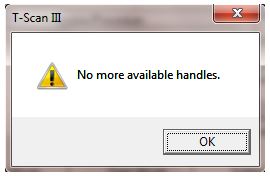
Issue: When trying to open a new Real-Time Window, you receive the error message: "No more available handles" (shown below).

No more available handles.No more available handles.

Solution: Close the software. Plug in the Evolution™ Handle (or VersaTek™ Hub and Cuffs). Then open the software.

If you are creating a new recording, the Evolution Handle (or VersaTek Hub and Cuffs) must be plugged in before starting the software. If you plug in the Hardware after the Tekscan software is running, you will see this error message when attempting to open a new Real-Time Window.

Note: In rare cases, a system reboot may be required.

Link to this FAQ

Does Tekscan software support local languages?

Question: Does Tekscan software support local languages?

Answer: Tekscan systems support a multitude of languages, including English, Chinese, French, German, Italian, Japanese, Korean, Russian and Spanish. Please refer to the table below to see full language availability.

Product Chinese Traditional Chinese Dutch English French German Greek Italian Japanese Korean Polish Russian Spanish
API1 (n/a)                          
API2 (n/a)                          
BPMS™ X   X X X X X X X X X X X
CoM'Nalysis™       X                  
CONFORMat™ X   X X X X X X X X X X X
ELF™       X                  
FastScan           X              
FastScan Mobile           X              
F-Scan™ X X X X X X X X X X X X X
F-Scan™ Mobile X   X X X   X X X X   X X
Grip™ X X X X X X X X X X X X X
Handheld       X                  
Hoof™ X X X X X X X X X X X X X
HR Mat™ X X X X X X X X X X X X X
I-Scan™ X   X X X X X X X X X X X
MatScan™ X X X X X X X X X X X X X
Presto-Scan™ X   X X X X X X X X X X X
Saddle™ X X X X X X X X X X X X X
TireScan™ X   X X X X X X X X X X X
T-Scan™ X   X X X X X X X X X X X
Walkway™       X   X              
Wiper™ X     X X X   X X X   X X

Note: Additional Software modules like SAM™ (Sway Analysis Module™), STAM™ (Stance Timing Analysis Module™), and TAM™ (Timing Analysis Module™) are supported by the same languages as their parent software.

Link to this FAQ

Can I Trim the FlexiForce sensor?

Question: Can I Trim the FlexiForce™ Sensor?

Answer: Yes - it is possible to trim the FlexiForce sensor if the sensing area is too large or the wrong shape for your application. Additionally, trimming the sensor can be a good way to develop a proof-of-concept before investing in a customized sensor solution. However, please keep in mind that trimming the sensing area can result in less durability, potential for shorting, and less sensitivity.
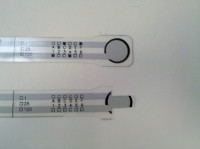
Trimmed FlexiForce sensorTrimmed FlexiForce sensorIf you attempt to trim the sensor, we recommend using a sharp pair of scissors to lessen the stress and/or deformation of the sensor that may occur when cutting. Once you've trimmed the sensor to the desired shape and/or size, you will want to apply a piece of tape to both sides of the sensor - this will help create a seal around the sensor keeping out dirt and debris.

If you need to punch a hole in the sensing area, we recommend creating a slightly larger hole than needed, applying tape on both sides of the sensing area, and then creating another smaller hole in the center. This will create a ring of tape around the hole you've just created and help to keep the sensor sealed.

Note: Tekscan cannot warranty sensors that have been physically altered.

Link to this FAQ

How do I clean my T-Scan system components?

Question: How do I clean my T-Scan™ system components?

Answer: The T-Scan III scanning handle cannot be sterilized but may be wrapped in plastic wrap for isolation from the patient. The sensor supports can be autoclaved or placed in cold sterilization liquid. Both the sensors and sensor supports can be cleaned with alcohol swabs. The same sensor can be used on the same patient across multiple sessions. The same sensor should not be used on different patients. Sensors are disposable after their useful life. Research has proven that our sensors can be used approximately 15-25 times each while still retaining our high standards of reliability.

Link to this FAQ

Why do I need an excitation circuit to read force with FlexiForce A201 sensors?

Question: Why do I need an excitation circuit to read force with FlexiForce™ A201 sensors?

Answer: You should use an excitation circuit to provide a constant drive voltage/current and provide an output voltage that is proportional to the applied force. Our FlexiForce QuickStart Board contains all the components necessary to build the recommended circuit, along with a detailed, step-by-step instruction manual.

Link to this FAQ

Can I customize a Tekscan sensor?

Question: Can I customize a Tekscan sensor?

Answer: Yes. If you cannot find a sensor that fits your application needs in our standard selection, we can work with you to custom design and manufacture a sensor. Your sales representative can provide you with additional information.

Link to this FAQ

Can I purchase only Tekscan sensors?

Question: Can I purchase only Tekscan sensors?

Answer: Tekscan’s patented array or grid sensors are designed to only work with our software and hardware; therefore you cannot simply purchase the sensors unless you own a Tekscan system. We offer single element force sensors that can be purchased without our electronics and software.

Link to this FAQ